
FBT/Exempt Foreign Income
Here you can enter any reportable FBT or Exempt Foreign Income amounts.
This is for STP reporting to the ATO at the end of the financial year.
This node also allows you to view amounts for previous years.
In addition, a reportable FBT report can be run to help calculate the amounts reportable in the current FBT year.
Viewing and Calculating Reportable FBT:
- Once the employee file is open, select the FBT/Exempt Foreign Income node on the left.
The Details screen will be displayed on the right. Any amounts from previous years are listed on this screen. - Double click an entry to edit it, or click on the Add New button to create a new entry by entering:
- Financial year which is the year that the reportable FBT or Exempt Foreign Income amount is to be allocated against.
- Reportable FBT Amount This option is used to specify if the reportable FBT amount entered is exempt from FBT under section 57A of the FBT Act.
- Exempt Foreign Income: the amount for the specified Fin Year.
NOTE: Employees cannot have a Reportable and a Non-Reportable FBT amount.
Calculating Reportable FBT:
- In the Pay Items File mark the required non-cash pay items as reportable for FBT.
The ATO can provide more information on the correct selections. - Pay the relevant benefits to employees in the payrun.
- Run the Reportable Fringe Benefits Report by doing the following:
- For one employee, from the employee file select FBT / Exempt Foreign Income click on the FBT Summary tab:
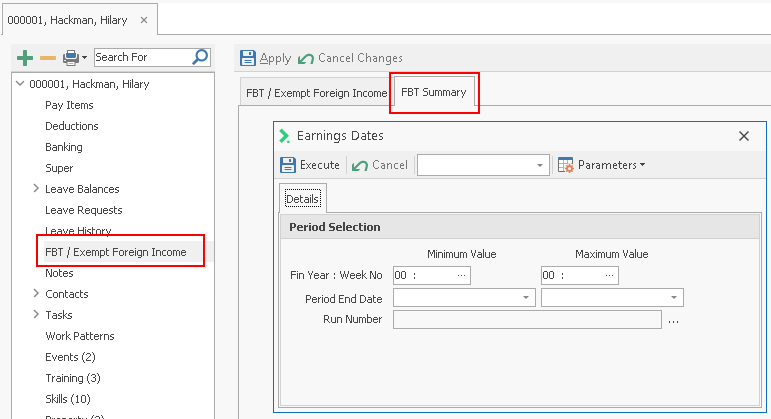
- For many employees, in the Report Explorergo to System Reports > Historical > Employee Based > Reportable Fringe Benefits.
- Select the payruns which fall within the FBT year (1st April to 31st March) and click on Execute to run the report.
 It is your responsibility to ensure that the FBT calculation is configured correctly. Check with the ATO for more information